How to Build a High-Converting Shopify Store from Scratch
Why Shopify is the Best Platform for Ecommerce Store Development
When it comes to ecommerce store development, Shopify stands above the competition for one simple reason: it removes every technical barrier between you and your customers. Unlike WooCommerce, which requires server management, or Magento, which demands developer-level expertise, Shopify gives you a complete, hosted solution that scales from your first sale to millions in annual revenue.
Here is why brands consistently choose Shopify for their ecommerce store development:
- Fully hosted infrastructure with 99.99% uptime SLA
- Built-in SSL certificates and PCI-compliant checkout
- Native mobile optimization out of the box
- 2,000+ apps in the Shopify App Store
- Shopify Payments to eliminate third-party payment gateway fees
- Multi-channel selling across social media, Amazon, and physical retail
- Robust analytics and reporting dashboard
- Shopify Markets for international ecommerce expansion
The numbers back this up. Shopify powers over 4.6 million online stores across 175 countries, processing more than 500 billion dollars in total commerce to date. For businesses serious about Shopify store development, there is no more proven platform.
Step 1: Planning Your Shopify Store Strategy
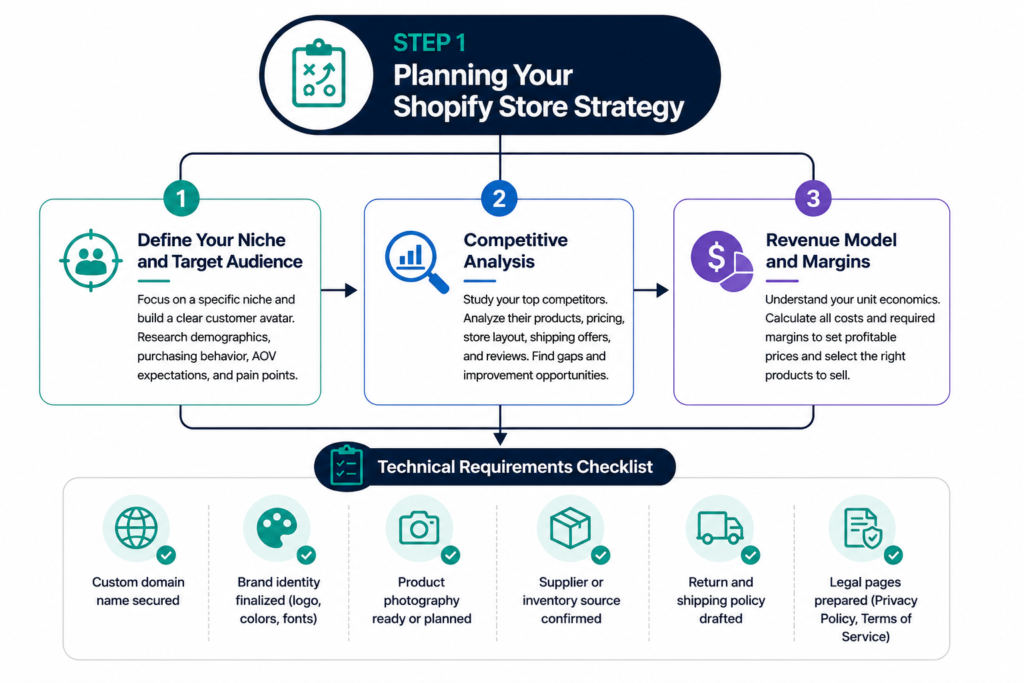
Every successful Shopify store development project starts with a clear strategy. Before you touch a theme or upload a single product, you need answers to three foundational questions.
Define Your Niche and Target Audience
Trying to sell everything to everyone is the fastest route to selling nothing. The most profitable Shopify stores are tightly focused on a specific niche with a well-defined customer avatar. Spend time researching your target audience’s demographics, purchasing behavior, average order value expectations, and primary pain points.
Competitive Analysis
Study your top five competitors’ Shopify stores carefully. Analyze their product catalog structure, pricing strategy, homepage layout, shipping offers, and customer reviews. Look for gaps you can exploit and best practices you can adopt and improve upon.
Revenue Model and Margins
Before you build, understand your unit economics. Calculate landed cost per product, Shopify transaction fees, shipping costs, return rates, and your required margin to be profitable. This will directly influence your pricing strategy and which products you prioritize.
Technical Requirements Checklist
- Custom domain name secured
- Brand identity finalized (logo, colors, fonts)
- Product photography ready or planned
- Supplier or inventory source confirmed
- Return and shipping policy drafted
- Legal pages prepared (Privacy Policy, Terms of Service)
Step 2: Choosing the Right Shopify Plan
Shopify offers multiple plans, and selecting the wrong one either limits your growth or costs you unnecessary money. Here is a straightforward breakdown for your Shopify store development decision
For most new Shopify store development projects, start with the Basic plan and upgrade as your revenue grows. The transaction fee savings on higher plans only become meaningful once you are processing significant monthly volume.
Step 3: Shopify Theme Setup and Store Design
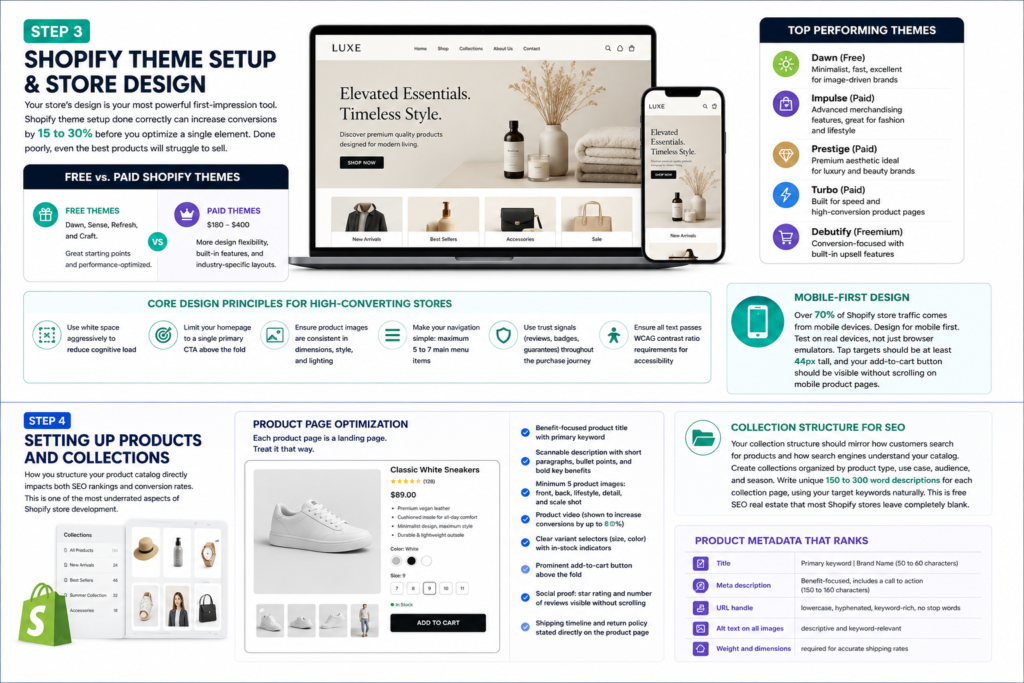
Your store’s design is your most powerful first-impression tool. Shopify theme setup done correctly can increase conversions by 15 to 30 percent before you optimize a single element. Done poorly, even the best products will struggle to sell.
Free vs. Paid Shopify Themes
Shopify offers free themes including Dawn, Sense, Refresh, and Craft. These are excellent starting points and are performance-optimized. Paid themes from the Shopify Theme Store range from $180 to $400 and typically offer more design flexibility, built-in features, and industry-specific layouts.
For most Shopify store development projects, consider these top-performing themes:
- Dawn (Free): Minimalist, fast, excellent for image-driven brands
- Impulse (Paid): Advanced merchandising features, great for fashion and lifestyle
- Prestige (Paid): Premium aesthetic ideal for luxury and beauty brands
- Turbo (Paid): Built for speed and high-conversion product pages
- Debutify (Freemium): Conversion-focused with built-in upsell features
Core Design Principles for High-Converting Shopify Stores
- Use white space aggressively to reduce cognitive load
- Limit your homepage to a single primary call to action above the fold
- Ensure product images are consistent in dimensions, style, and lighting
- Make your navigation simple: maximum 5 to 7 main menu items
- Use trust signals (reviews, badges, guarantees) throughout the purchase journey
- Ensure all text passes WCAG contrast ratio requirements for accessibility
Mobile-First Design
Over 70 percent of Shopify store traffic comes from mobile devices. Every design decision during your Shopify theme setup must prioritize mobile experience. Test on real devices, not just browser emulators. Tap targets should be at least 44 pixels tall, and your add-to-cart button should be visible without scrolling on mobile product pages.
Step 4: Setting Up Products and Collections
How you structure your product catalog directly impacts both SEO rankings and conversion rates. This is one of the most underrated aspects of Shopify store development.
Product Page Optimization
Each product page is a landing page. Treat it that way. A high-converting Shopify product page includes:
- Benefit-focused product title with primary keyword included naturally
- Scannable description with short paragraphs, bullet points, and bold key benefits
- Minimum 5 product images: front, back, lifestyle, detail, and scale shot
- Product video (shown to increase conversions by up to 80 percent)
- Clear variant selectors (size, color) with in-stock indicators
- Prominent add-to-cart button in high-contrast color above the fold
- Social proof: star rating and number of reviews visible without scrolling
- Shipping timeline and return policy stated directly on the product page
Collection Structure for SEO
Your collection structure should mirror how customers search for products and how search engines understand your catalog. Create collections organized by product type, use case, audience, and season. Write unique 150 to 300 word descriptions for each collection page, using your target keywords naturally. This is free SEO real estate that most Shopify stores leave completely blank.
Product Metadata That Ranks
- Title: Primary keyword | Brand Name (50 to 60 characters)
- Meta description: Benefit-focused, includes a call to action (150 to 160 characters)
- URL handle: lowercase, hyphenated, keyword-rich, no stop words
- Alt text on all images: descriptive and keyword-relevant
- Weight and dimensions: required for accurate shipping rates
Step 5: Configuring Payments, Shipping and Tax
Payment Gateway Setup
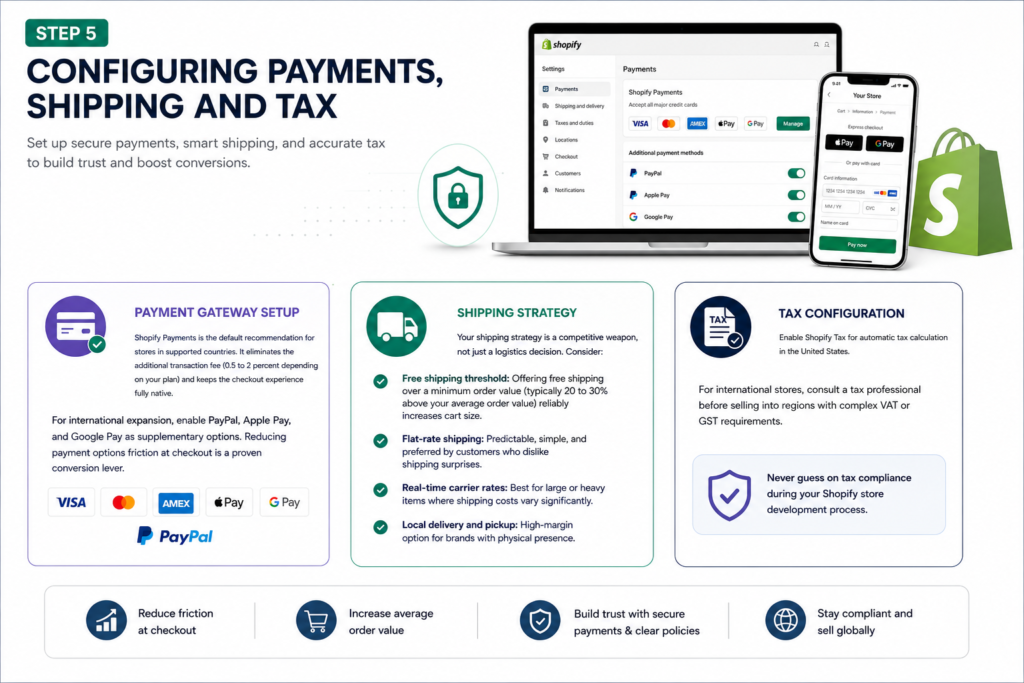
Shopify Payments is the default recommendation for stores in supported countries. It eliminates the additional transaction fee (0.5 to 2 percent depending on your plan) and keeps the checkout experience fully native. For international expansion, enable PayPal, Apple Pay, and Google Pay as supplementary options. Reducing payment options friction at checkout is a proven conversion lever.
Shipping Strategy
Your shipping strategy is a competitive weapon, not just a logistics decision. Consider:
- Free shipping threshold: Offering free shipping over a minimum order value (typically 20 to 30 percent above your average order value) reliably increases cart size
- Flat-rate shipping: Predictable, simple, and preferred by customers who dislike shipping surprises
- Real-time carrier rates: Best for large or heavy items where shipping costs vary significantly
- Local delivery and pickup: High-margin option for brands with physical presence
Tax Configuration
Enable Shopify Tax for automatic tax calculation in the United States. For international stores, consult a tax professional before selling into regions with complex VAT or GST requirements. Never guess on tax compliance during your Shopify store development process.
Step 6: Shopify SEO Fundamentals
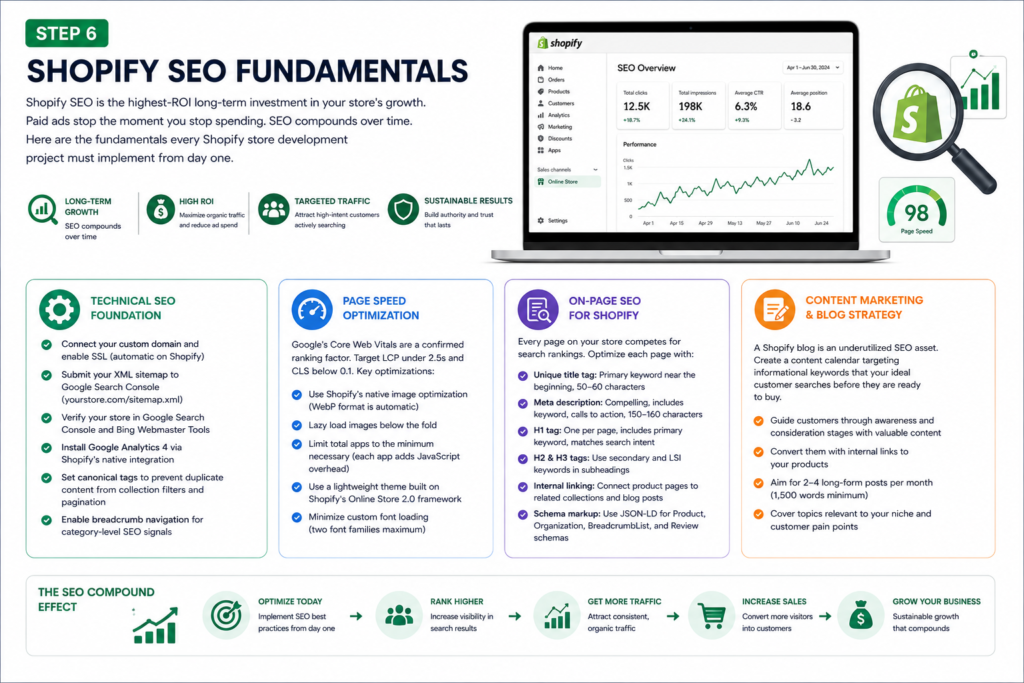
Shopify SEO is the highest-ROI long-term investment in your store’s growth. Paid ads stop the moment you stop spending. SEO compounds over time. Here are the fundamentals every Shopify store development project must implement from day one.
Technical SEO Foundation
- Connect your custom domain and enable SSL (automatic on Shopify)
- Submit your XML sitemap to Google Search Console (yourstore.com/sitemap.xml)
- Verify your store in Google Search Console and Bing Webmaster Tools
- Install Google Analytics 4 via Shopify’s native integration
- Set canonical tags to prevent duplicate content from collection filters and pagination
- Enable breadcrumb navigation for category-level SEO signals
Page Speed Optimization
Google’s Core Web Vitals are a confirmed ranking factor. Target a Largest Contentful Paint under 2.5 seconds and a Cumulative Layout Shift score below 0.1. Key optimizations for Shopify store speed:
- Use Shopify’s native image optimization (WebP format is automatic)
- Lazy load images below the fold
- Limit total apps to the minimum necessary (each app adds JavaScript overhead)
- Use a lightweight theme built on Shopify’s Online Store 2.0 framework
- Minimize custom font loading (two font families maximum)
On-Page SEO for Shopify
Every page on your Shopify store competes for search rankings. Optimize each page with:
- Unique title tag: Primary keyword near the beginning, 50 to 60 characters
- Meta description: Compelling, includes keyword, calls to action, 150 to 160 characters
- H1 tag: One per page, includes primary keyword, matches search intent
- H2 and H3 tags: Use secondary and LSI keywords in subheadings
- Internal linking: Connect product pages to related collections and blog posts
- Schema markup: Use JSON-LD for Product, Organization, BreadcrumbList, and Review schemas
Content Marketing and Blog Strategy
A Shopify blog is an underutilized SEO asset. Create a content calendar targeting informational keywords that your ideal customer searches before they are ready to buy. Guide them through the awareness and consideration stages with high-quality content, then convert them with internal links to your products. Aim for two to four long-form posts per month (1,500 words minimum) covering topics relevant to your niche.
Step 7: Conversion Optimization for Your Shopify Store
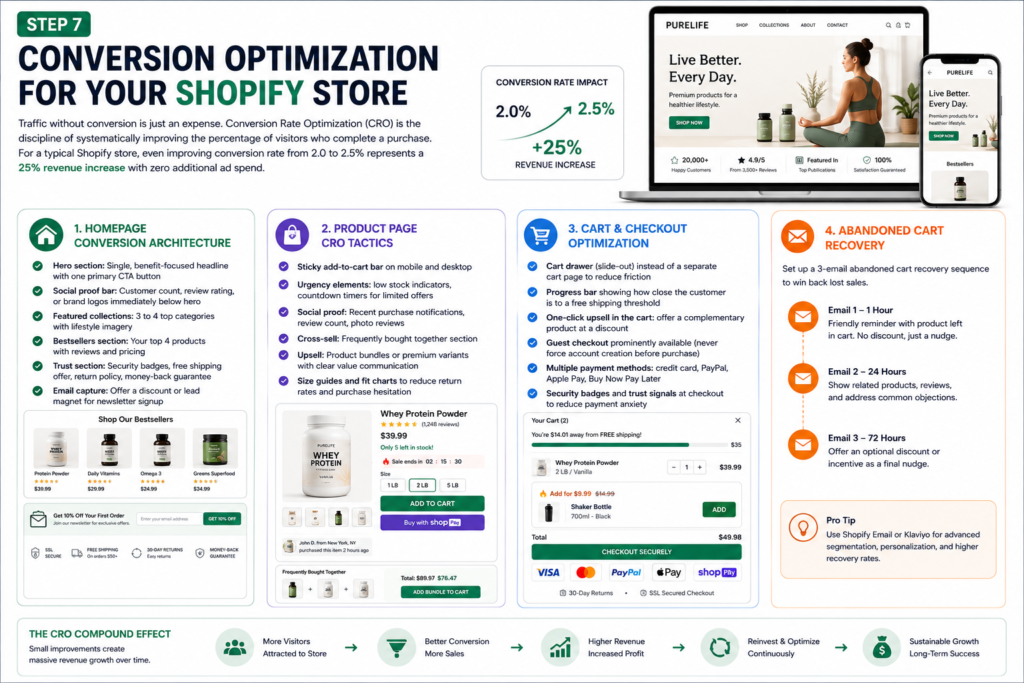
Traffic without conversion is just an expense. Conversion rate optimization (CRO) is the discipline of systematically improving the percentage of visitors who complete a purchase. For a typical Shopify store, even improving conversion rate from 2.0 to 2.5 percent represents a 25 percent revenue increase with zero additional ad spend.
Homepage Conversion Architecture
- Hero section: Single, benefit-focused headline with one primary CTA button
- Social proof bar: Customer count, review rating, or brand logos immediately below hero
- Featured collections: 3 to 4 top categories with lifestyle imagery
- Bestsellers section: Your top 4 products with reviews and pricing
- Trust section: Security badges, free shipping offer, return policy, money-back guarantee
- Email capture: Offer a discount or lead magnet for newsletter signup
Product Page CRO Tactics
- Sticky add-to-cart bar on mobile and desktop
- Urgency elements: low stock indicators, countdown timers for limited offers
- Social proof: Recent purchase notifications, review count, photo reviews
- Cross-sell: Frequently bought together section
- Upsell: Product bundles or premium variants with clear value communication
- Size guides and fit charts to reduce return rates and purchase hesitation
Cart and Checkout Optimization
Cart abandonment averages 70 percent across ecommerce stores. Reduce it with:
- Cart drawer (slide-out) instead of a separate cart page to reduce friction
- Progress bar showing how close the customer is to a free shipping threshold
- One-click upsell in the cart: offer a complementary product at a discount
- Guest checkout prominently available (never force account creation before purchase)
- Multiple payment methods: credit card, PayPal, Apple Pay, Buy Now Pay Later
- Security badges and trust signals at checkout to reduce payment anxiety
Abandoned Cart Recovery
Set up a 3-email abandoned cart recovery sequence: first email at 1 hour (no discount, just a reminder), second email at 24 hours (show related products or address common objections), third email at 72 hours (optional small discount as a final nudge). Shopify’s native email marketing handles this natively, or use Klaviyo for advanced segmentation and personalization.
Step 8: Essential Shopify Apps to Install
The Shopify App Store has over 8,000 apps. Installing too many degrades site performance. Here are the essential categories and recommended apps for a high-converting Shopify store development stack.
Category | Recommended App | Purpose |
Email Marketing | Klaviyo | Flows, segmentation, abandoned cart |
Product Reviews | Judge.me / Loox | Photo reviews, trust building |
Upsell / Cross-sell | ReConvert / Zipify | Post-purchase and in-cart upsells |
SEO | Plug In SEO / TinyIMG | Meta optimization, image compression |
Loyalty Program | Smile.io / Yotpo | Points, rewards, referral programs |
Live Chat / Support | Tidio / Gorgias | Instant support, reduce pre-buy hesitation |
Subscription | Recharge / Bold | Recurring revenue from repeat buyers |
Analytics | Triple Whale / Northbeam | Attribution, ROAS tracking across channels |
Inventory | Stocky / Katana | Purchase orders, low stock alerts |
Returns | Loop Returns | Self-service returns, reduce support load |
Step 9: Launching and Testing Your Store
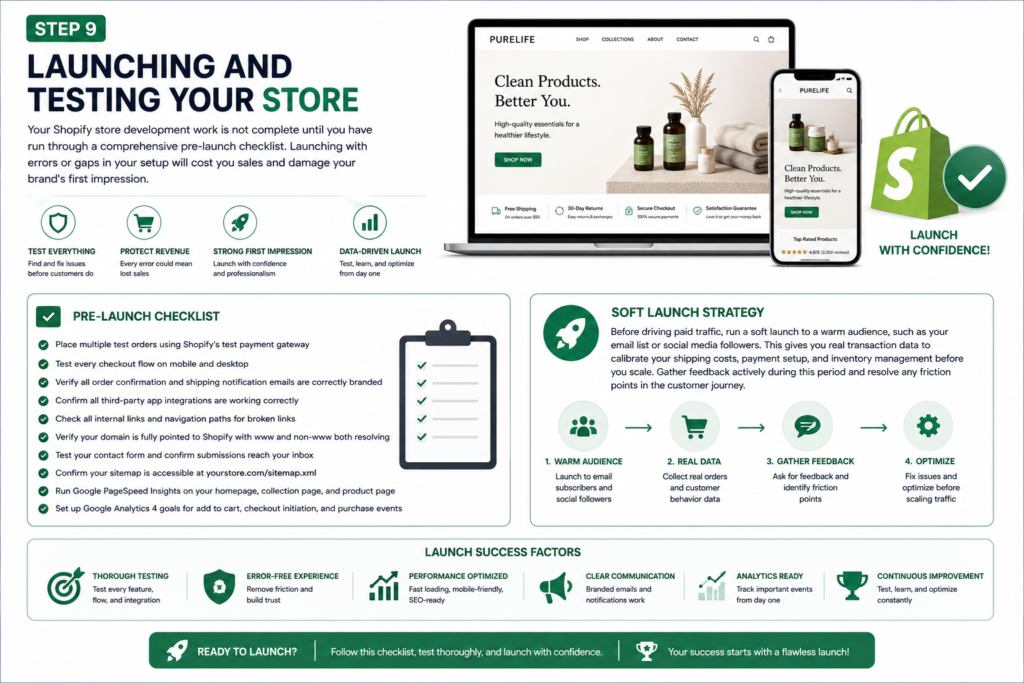
Your Shopify store development work is not complete until you have run through a comprehensive pre-launch checklist. Launching with errors or gaps in your setup will cost you sales and damage your brand’s first impression.
Pre-Launch Checklist
- Place multiple test orders using Shopify’s test payment gateway
- Test every checkout flow on mobile and desktop
- Verify all order confirmation and shipping notification emails are correctly branded
- Confirm all third-party app integrations are working correctly
- Check all internal links and navigation paths for broken links
- Verify your domain is fully pointed to Shopify with www and non-www both resolving
- Test your contact form and confirm submissions reach your inbox
- Confirm your sitemap is accessible at yourstore.com/sitemap.xml
- Run Google PageSpeed Insights on your homepage, collection page, and product page
- Set up Google Analytics 4 goals for add to cart, checkout initiation, and purchase events
Soft Launch Strategy
Before driving paid traffic, run a soft launch to a warm audience, such as your email list or social media followers. This gives you real transaction data to calibrate your shipping costs, payment setup, and inventory management before you scale. Gather feedback actively during this period and resolve any friction points in the customer journey.
Step 10: Post-Launch Growth Strategies
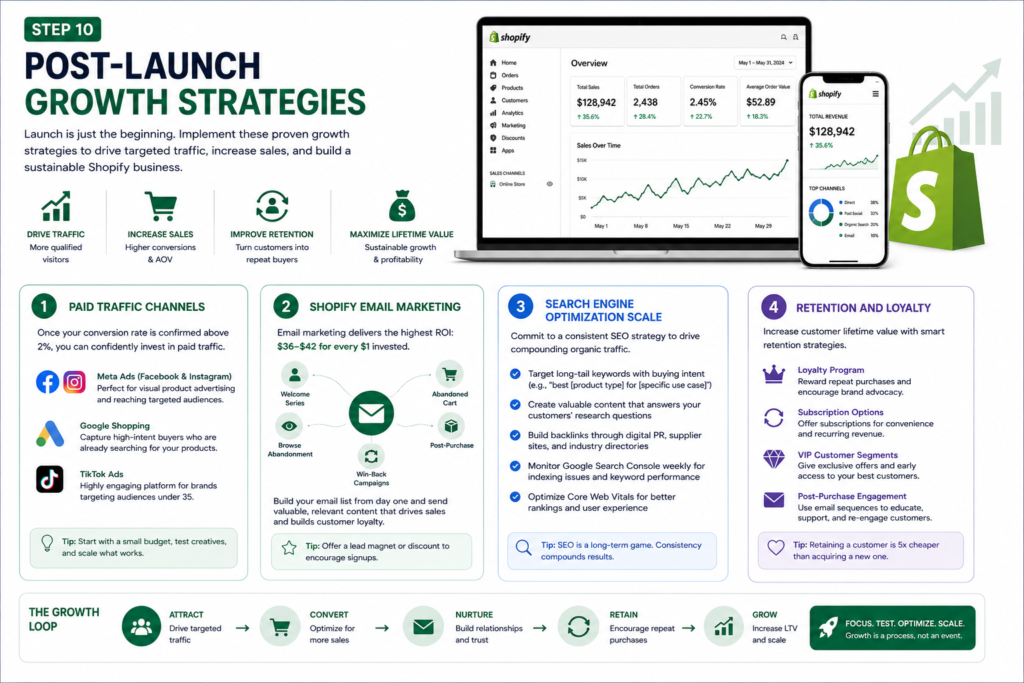
Paid Traffic Channels
Once your conversion rate is confirmed above 2 percent, you can confidently invest in paid traffic. Start with Meta Ads (Facebook and Instagram) for direct-to-consumer product advertising, as the visual format aligns perfectly with Shopify product categories. Google Shopping campaigns capture high-intent buyers who are already searching for your products. TikTok Ads are increasingly powerful for brands targeting audiences under 35.
Shopify Email Marketing
Email marketing consistently delivers the highest return on investment of any ecommerce channel, with industry averages of $36 to $42 for every $1 invested. Prioritize building your email list from day one. Set up core automated flows immediately: welcome series, abandoned cart, browse abandonment, post-purchase, and win-back campaigns. Then layer in regular campaign emails to your full list.
Search Engine Optimization Scale
After launch, commit to a consistent SEO content program. Target long-tail keywords with buying intent such as ‘best [product type] for [specific use case]’ and informational queries your ideal customer searches during the research phase. Build backlinks through digital PR, supplier websites, and industry directories. Monitor Google Search Console weekly for indexing issues, keyword performance trends, and Core Web Vitals status.
Retention and Loyalty
Customer acquisition cost continues to rise across all paid channels. The most sustainable growth strategy for any Shopify store is to increase customer lifetime value through retention marketing. Implement a loyalty program, subscription options where applicable, VIP customer segments with exclusive offers, and a proactive post-purchase email sequence that turns first-time buyers into repeat customers.
Common Shopify Store Development Mistakes to Avoid
After working with dozens of Shopify brands, these are the mistakes that most consistently kill conversion rates and stall growth.
- Launching with a slow theme: page speed is a ranking factor and a conversion factor. Test before you launch.
- Ignoring mobile product pages: your desktop view may look perfect while your mobile experience is broken
- Thin product descriptions: copy that fails to address objections, build desire, and close the sale will drag conversions down regardless of your traffic quality
- No trust signals: first-time buyers are inherently skeptical. Badges, reviews, guarantees, and clear policies remove doubt at the point of purchase
- Installing too many apps: every app adds page weight and load time. Audit your app stack quarterly and remove anything that does not directly contribute to revenue
- Skipping email capture from day one: your email list is your most valuable owned asset. Start building it before your first sale
- Neglecting collection page SEO: collection pages often have higher commercial search volume than individual product pages. Write unique descriptions and optimize their metadata
- Setting and forgetting: successful Shopify store development is an ongoing process. Analyze your data weekly, run A/B tests consistently, and iterate based on evidence
Building a high-converting Shopify store from scratch is not a one-time task. It is a systematic process of strategic planning, precise technical execution, and continuous optimization. Every element described in this guide, from your Shopify theme setup to your abandoned cart sequence, works together to create a purchase experience that builds trust and drives revenue.
The brands that win with Shopify store development are those that treat their online store as a living product, not a one-time project. They measure everything, test consistently, and optimize relentlessly.
If you are looking for expert Shopify store development services that take your brand from concept to conversion, our team specializes in building custom Shopify stores engineered for measurable growth. From initial strategy to post-launch optimization, we handle the technical complexity so you can focus on scaling your business.
Not Sure Which Platform is Right for Your Brand?
Kodavia's team analyzes your business model, growth goals, and technical requirements to recommend and build the exact ecommerce setup that converts. No guesswork, just data-driven decisions.