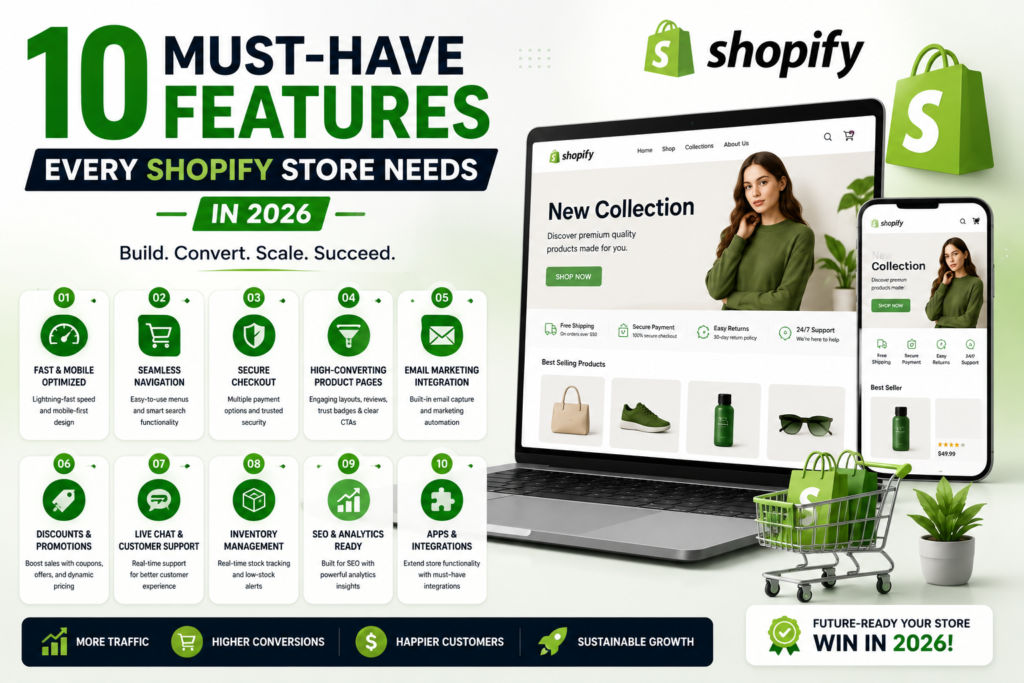
10 Must-Have Features Every Shopify Store Needs in 2026
AI-powered software for e-commerce brands.

10 Must-Have Features Every Shopify Store Needs in 2026

10 must-have Shopify store features for 2026 infographic showing mobile optimization, secure checkout, SEO tools, email marketing, analytics, and ecommerce growth features

Shopify store features 2026 define whether your brand scales or stagnates. In 2026, the stores generating consistent revenue are the ones that built the right infrastructure — and this guide breaks down exactly what that looks like.

This guide breaks down the 10 features that the highest-performing Shopify stores are already using, with real data, implementation steps, and the revenue impact of each. Treat these Shopify store features 2026 as a checklist for the upgrades that move revenue the most.

Key Statistics

69%of shoppers abandon cart due to poor checkout experience
4.2xhigher conversion rate for stores with AI personalization
73%of e-commerce traffic now comes from mobile devices

1. AI-Powered Product Recommendations: Top Shopify Store Features 2026

Among all the Shopify store features 2026 that matter, smart personalization leads the list. Generic ‘you may also like’ carousels are dead. In 2026, buyers expect recommendations that feel personally chosen. AI recommendation engines analyze real-time browsing behavior, purchase history, and session data to surface products each visitor is most likely to buy.

Stores using behavioral AI recommendations report average order value increases of 15 to 35 percent — often outperforming entire paid media campaigns in revenue contribution.

These AI-driven Shopify store features 2026 are explored in depth in our Shopify growth services, and you can review the official capabilities on the Shopify platform.

How AI Recommendations Work — Flowchart

1
Visitor arrives → Session data collected (device, source, time on site)
2
Browsing behavior tracked → Products viewed, time spent, cart actions recorded
3
AI model cross-references with purchase history and cohort data
4
Ranked product list generated in real-time for this specific visitor
5
Recommendations displayed on product page, cart, email, and post-purchase

AOV Lift by Recommendation Type — Bar Chart

No recommendations
0%
Basic related products
+12%
+12%
Rule-based engine
+22%
+22%
AI behavioral engine
+35%
+35%
AI + real-time session
+42%
+42%
 

💡  Why It Matters:  Stores with AI recommendations see up to 35% higher average order value. This is your highest-ROI investment after your product pages.

2. Mobile-First Checkout Experience

Over 73% of e-commerce traffic is now mobile, yet most Shopify stores treat mobile checkout as an afterthought. A slow, cluttered, or confusing mobile checkout is the single biggest revenue drain for growing brands in 2026.

CheckpointStatus CheckImpact if Missing
One-tap payments (Shop Pay, Apple Pay)Visible above fold on mobile?Up to 30% drop in mobile CVR
Form field sizeLarge enough to tap without zoom?Frustration and abandonment
Progress indicatorDo buyers know how many steps remain?+18% completion rate when present
Address autocompleteWorking without errors?Major friction point on mobile
Page load under 3s on 4GTested on real mobile network?53% of users leave after 3 seconds
Guest checkout optionAvailable without forced account?+45% new customer conversion

💡  Why It Matters:  A one-second delay in mobile load time costs up to 20% of conversions. Mobile checkout is not a UX detail. It is a revenue decision.

3. Sub-3 Second Page Load Speed

Page speed is a conversion factor and an SEO ranking signal. In 2026, Google’s Core Web Vitals directly influences where your store appears in search. A store loading in under 3 seconds converts at a significantly higher rate than one taking 5 seconds.

MetricWhat It MeasuresGood ScorePoor ScoreShopify Fix
LCPLargest visible element load< 2.5s> 4.0sOptimize hero image, use CDN
INPTime to first interaction< 100ms> 200msRemove unused JS apps
CLSUnexpected layout movement< 0.1> 0.25Set image dimensions explicitly
TTFBServer response time< 800ms> 1.8sUse Shopify CDN, optimize Liquid

Speed Optimization Priority

Remove unused app scripts
Highest Impact
Convert images to WebP
High
Enable lazy loading
High
Defer non-critical JS
Medium-High
Minify CSS and JS
Medium

💡  Why It Matters:  53% of mobile users leave a page that takes more than 3 seconds to load. Speed is not a technical metric. It is a sales metric.

4. Automated Email and SMS Flows

Every Shopify store needs automated flows running in the background, generating revenue without manual effort. These flows are the foundation of a sustainable e-commerce business that does not rely entirely on paid acquisition.

Essential Flows Every Store Needs

Flow NameTriggerEmails / SMSAvg Revenue Share
Welcome SeriesNew subscriber signup3–5 emails8–12% of flow revenue
Abandoned CartCart left > 1 hour3 emails + 1 SMS25–35% of flow revenue
Post-PurchaseOrder confirmed4 emails15–20% of flow revenue
Browse AbandonmentProduct viewed, no cart2 emails5–10% of flow revenue
Win-Back CampaignNo purchase in 90 days3 emails + 1 SMS10–15% of flow revenue
Review Request7 days post-delivery1–2 emailsDrives UGC + repeat buy

💡  Why It Matters:  Automated flows generate an average of 30% of e-commerce revenue. Once built, they run indefinitely with no ad spend required.

5. Reviews and User-Generated Content System

Buyers trust other buyers more than any brand. In 2026, a product page without reviews is a product page that loses sales to competitors who have them.

0 reviews (baseline)
1–10 reviews
+52% CVR lift
11–50 reviews
+130% CVR lift
50+ reviews
+270% CVR lift
Review Platform Comparison
PlatformPhoto/VideoGoogle IntegrationShopify NativeBest For
Judge.meYesYesYesBudget-friendly, full features
OkendoYesYesYesMid-market, rich UGC
YotpoYesYesYesEnterprise, loyalty bundle
Stamped.ioYesPartialYesMid-market, NPS tracking

6. Smart On-Site Search

Visitors who use your site search convert at 2–3x the rate of those who browse. Yet most Shopify stores use the default search, which is literal and blind to synonyms or intent.

Default Search vs Smart Search

CapabilityShopify DefaultSmart Search (e.g. Algolia)
Typo toleranceNoneAuto-corrects spelling
Synonym recognitionNoneFully configurable
Natural language queriesNot supportedSemantic search
Zero-result page fallbackBlank pageSmart suggestions shown
Merchandising rulesNonePin, boost, bury products
Analytics and insightsNot availableFull search dashboard

💡  Why It Matters:  Search users convert 2–3x more than browsers. Poor search is one of the most underestimated revenue gaps on Shopify stores.

7. Buy Now Pay Later (BNPL) Integration

BNPL has moved from a novelty to an expectation in 2026. Shoppers, particularly those under 35, actively filter out stores that do not offer a split-payment option.

BNPL Provider Comparison
ProviderSplit StructureMerchant FeeBest MarketShopify
Klarna4 payments / 0% interest~2.99% + $0.30US, EU, UKNative
Afterpay4 payments / 0% interest~4–6%US, AU, CANative
Affirm3–36 months financing~3–30%USNative
Sezzle4 payments~3.5%US, CAApp

💡  Why It Matters:  Stores with BNPL see up to 45% increase in AOV for eligible orders. It pays for itself within days of going live.

8. Real-Time Analytics Dashboard

You cannot grow a business you cannot measure. The default Shopify analytics dashboard gives surface-level data. In 2026, winning stores pull together data from ad accounts, email platforms, and Shopify into one unified view.

Analytics Setup Flow

1
Connect Shopify → Google Analytics 4 + Meta Pixel + Klaviyo
2
Send all data to a central source (Shopify Reports, Triple Whale, or BigQuery)
3
Build unified dashboard in Looker Studio or Triple Whale
4
Set daily KPI alerts: CAC, ROAS, CVR, AOV, LTV by cohort
5
Review daily → make budget decisions with full attribution clarity

KPIs Every Shopify Dashboard Must Show

KPIWhat It Tells YouReview Frequency
Conversion Rate (CVR)What % of visitors buyDaily
Customer Acquisition Cost (CAC)What it costs to get one customerDaily
Average Order Value (AOV)Revenue per transactionDaily
Customer Lifetime Value (LTV)Total revenue per customer over timeWeekly
Repeat Purchase RateHow often buyers returnWeekly
Return on Ad Spend (ROAS)Revenue per $1 of ad spendDaily
Cart Abandonment Rate% of carts that never checkoutWeekly
Email Revenue Share% of total revenue from email flowsWeekly

9. Trust and Security Signals Throughout the Store

First-time buyers are skeptical. In 2026, with the volume of new Shopify stores launching every day, trust signals are what separate a legitimate brand from a random dropshipper in the mind of a new visitor.

Trust Signal Placement Guide

Trust ElementWhere to Place ItConversion Impact
SSL badge + Secure checkoutCheckout page header+11% checkout completion
Payment logos (Visa, PayPal)Cart and checkout footer+9% trust perception
Money-back guarantee badgeProduct page and cart+17% CVR on cold traffic
Real reviews with verified tagsProduct page, below the fold+270% CVR with 50+ reviews
Clear returns policy linkProduct page, header, footerReduces hesitation at cart
Live chat or WhatsApp visibleSticky on all pages+6% conversion on queries

💡  Why It Matters:  Adding trust badges and a visible returns policy increases conversion rates by 17% on average for stores selling to cold traffic.

10. Loyalty and Retention Program

Acquiring a new customer costs five times more than retaining an existing one. Yet most Shopify stores invest almost nothing in retention. A well-built loyalty program compounds your return on every new customer you bring in.

Repeat Purchase Probability by Order Count

1st purchase (new customer)
25%
2nd purchase
45%
3rd purchase
54%
4th purchase and beyond
72%

Loyalty Program Mechanics That Work

MechanicHow It WorksEngagement Rate
Points per purchase1 point per $1 spent, redeemable for discountsHigh — clear value exchange
Referral rewards$10 credit for referrer + $10 off for friendVery High — creates viral loop
Birthday bonusDouble points or free gift in birthday monthHigh — feels personal
VIP tiersSilver / Gold / Platinum based on annual spendHigh — status-driven behavior
Early accessLoyalty members see new products 24 hours earlyMedium — drives exclusivity
Review rewardsPoints earned for leaving a photo or video reviewHigh — drives UGC naturally

Where to Start: Priority Decision Matrix

Your Current ProblemStart With These FeaturesTimeline
CVR under 2%Mobile checkout (02) + Trust signals (09) + Speed (03)Week 1–2
High traffic, low salesAI recommendations (01) + Smart search (06) + Reviews (05)Week 1–3
Low AOVBNPL (07) + AI recommendations (01) + Email flows (04)Week 1–2
No repeat buyersLoyalty program (10) + Email flows (04) + Reviews (05)Week 2–4
No data clarityAnalytics dashboard (08) first — then everything elseWeek 1
Shopify Development Agency

Not Sure Which Platform is Right for Your Brand?

Kodavia's team analyzes your business model, growth goals, and technical requirements to recommend and build the exact ecommerce setup that converts. No guesswork, just data-driven decisions.
Get a Free Platform Audit →
View Shopify Services

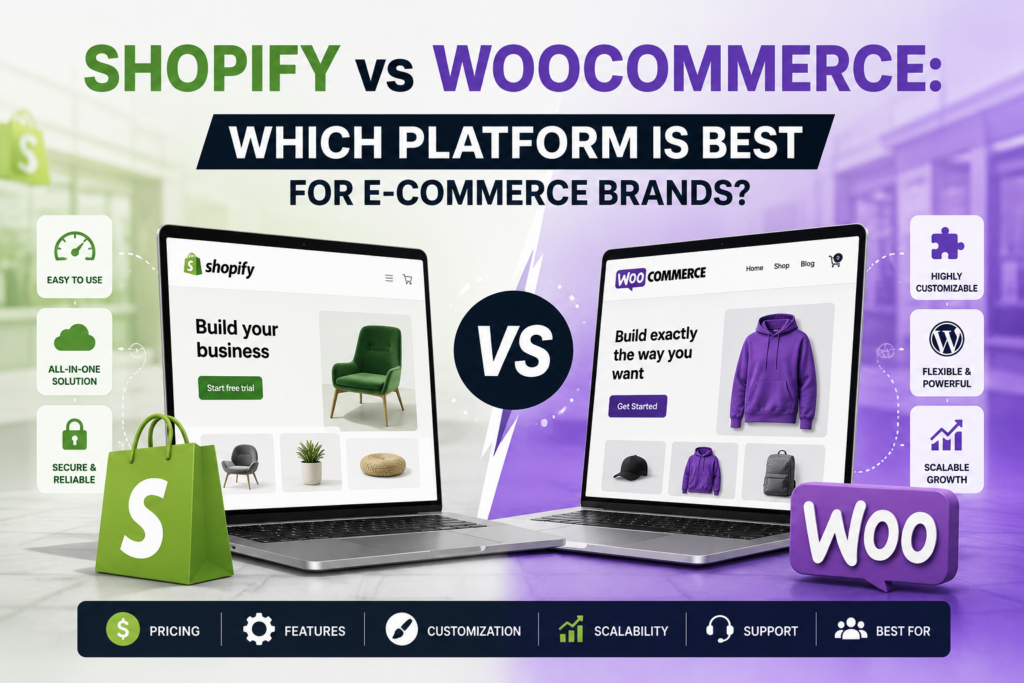
Shopify vs WooCommerce: Which Platform is Best for E-commerce Brands?

Shopify vs WooCommerce comparison illustration showing ecommerce platform features, customization options, scalability, pricing, and store management capabilities

The Platform Decision That Shapes Your Business

Choosing between Shopify and WooCommerce is one of the most consequential decisions you will make for your ecommerce business. Get it right and you have a foundation built for growth. Get it wrong and you spend years fighting your own platform instead of scaling your brand.

This is not a shallow “both are great” comparison. This guide gives you an honest, data-driven analysis of both platforms across every dimension that actually affects revenue: setup time, ongoing cost, SEO capability, conversion optimization, scalability, and long-term total cost of ownership.

By the end, you will know exactly which platform fits your specific situation, and what steps to take next.

4.6M+
Shopify stores active globally
6.6M+
WooCommerce stores worldwide
29%
of all ecommerce sites use WooCommerce
10%
of all ecommerce sites use Shopify
$500B+
Total Shopify GMV processed

Platform Overview: What You Are Actually Choosing Between

What is Shopify?

Shopify is a fully hosted Software-as-a-Service (SaaS) ecommerce platform. You pay a monthly subscription and Shopify handles everything: hosting, security, software updates, SSL certificates, CDN, and checkout. You focus entirely on your products and marketing. Shopify is purpose-built for selling online and has no other job.

Key insight: Shopify’s biggest strength is what it removes from your plate. Every technical decision is already made for you at a level most businesses cannot match on their own.

What is WooCommerce?

WooCommerce is a free open-source ecommerce plugin for WordPress. It transforms any WordPress site into an online store. Because WordPress powers 43 percent of all websites on the internet, WooCommerce has massive reach and a vast plugin ecosystem. However, “free” is misleading: you still need to pay for hosting, a domain, SSL, security plugins, premium extensions, and developer time.

Important distinction: WooCommerce is free to install but the total cost of ownership is often higher than Shopify once you account for hosting, security, plugins, and developer hours.

Full Feature-by-Feature Comparison: Shopify vs WooCommerce

Here is a complete head-to-head comparison across the 15 factors that matter most to ecommerce brands.

Feature Shopify WooCommerce Winner
Setup TimeMinutesHours to daysShopify
HostingFully managedSelf-managedShopify
Monthly Cost$39 to $399+$0 pluginWooCommerce
Security & SSLAutomaticManual setupShopify
CustomizationTheme-limitedUnlimitedWooCommerce
SEO ControlGood, restrictedFull controlWooCommerce
ScalabilityAuto-scalingNeeds setupShopify
Payment OptionsShopify Pay preferredAny gatewayWooCommerce
Transaction Fees0.5% to 2%NoneWooCommerce
Checkout ControlLimitedFull controlWooCommerce
Apps / Plugins8,000+ apps59,000+ pluginsTie
Support24/7 officialCommunity onlyShopify
Technical SkillNone neededMedium to highShopify
Multi-currencyBuilt-inPlugin requiredShopify
POS / RetailNative POSThird-partyShopify
Platform Performance Scorecard (out of 10)
Head-to-head comparison across key ecommerce metrics
Shopify
WooCommerce
Ease of Setup
S
9.6 / 10
W
4.5 / 10
Scalability
S
9.2 / 10
W
7.0 / 10
Customization
S
6.5 / 10
W
9.5 / 10
Security
S
9.5 / 10
W
6.8 / 10
Cost Efficiency
S
6.2 / 10
W
8.0 / 10

Real Cost Breakdown: Shopify vs WooCommerce

This is where most comparisons mislead you. WooCommerce appears free. Shopify appears expensive. The reality is more nuanced once you calculate total annual cost of ownership.

Shopify Total Annual Cost

  • Shopify plan: $468 to $4,788 per year (Basic to Advanced)
  • Domain name: approximately $14 per year
  • Email marketing app (Klaviyo): from $0 to $150+ per month depending on list size
  • Review app (Judge.me): $15 per month
  • Transaction fees: 0 percent with Shopify Payments, 0.5 to 2 percent without
  • Theme: $0 (free) to $400 (one-time, paid)
  • Total for a growing store: approximately $700 to $3,500 per year

WooCommerce Total Annual Cost

  • WooCommerce plugin: free, but hosting required
  • Managed WordPress hosting (Kinsta, WP Engine): $300 to $2,400 per year
  • SSL certificate: $0 (Let’s Encrypt) to $100 per year
  • Security plugin (Wordfence, Sucuri): $100 to $500 per year
  • Premium WooCommerce extensions: $200 to $1,000+ per year
  • Developer hours for maintenance and updates: $500 to $5,000+ per year
  • Total for a growing store: approximately $1,200 to $9,000 per year

Verdict on cost: WooCommerce can be cheaper for tiny stores with minimal plugins and technical owners who do their own maintenance. For most ecommerce brands, Shopify’s all-inclusive cost is more predictable and often lower once you account for developer time.

SEO Comparison: Shopify vs WooCommerce

SEO is a major battleground in this debate. The truth is more nuanced than the “WooCommerce wins SEO” narrative you will read on most WordPress blogs.

Where WooCommerce Wins on SEO

  • Full control over URL structure including subfolder organization
  • Ability to edit robots.txt, .htaccess, and server-level configurations
  • Yoast SEO and Rank Math plugins offer deep on-page optimization tools
  • Full Schema markup control through plugins and custom code
  • No URL restrictions: Shopify forces /collections/, /products/, /pages/ prefixes
  • Better for content-heavy sites where a blog drives significant organic traffic

Where Shopify Holds Its Own on SEO

  • Automatic sitemap generation and submission
  • Built-in CDN means faster page loads globally, a ranking signal
  • Online Store 2.0 themes are optimized for Core Web Vitals out of the box
  • Native structured data for products, reviews, and breadcrumbs
  • Less risk of a misconfigured plugin breaking your entire site’s indexing
  • Shopify handles canonical tags automatically, preventing duplicate content

Real talk: WooCommerce gives you more SEO control. But control only helps if you use it correctly. A well-configured Shopify store consistently outranks a poorly managed WooCommerce store. For most ecommerce brands that are not SEO specialists, Shopify’s automated SEO handling reduces risk significantly.

Scalability: Which Platform Grows With Your Brand?

Scalability has two dimensions: traffic scalability and business model scalability. Both platforms approach this very differently.

Shopify Scalability

Shopify’s infrastructure auto-scales with your traffic. During Black Friday, Shopify handled over 40 million requests per minute across its merchant base with zero downtime. You never need to upgrade your hosting plan, configure a CDN, or worry about your store crashing during a product launch. Shopify Plus, the enterprise tier, powers brands doing hundreds of millions in annual revenue on the exact same infrastructure.

WooCommerce Scalability

WooCommerce can scale to very high volumes, but it requires engineering investment to do so. You need managed cloud hosting (AWS, Google Cloud, or a premium managed WordPress host), database optimization, object caching with Redis or Memcached, and a CDN configuration. Done correctly, WooCommerce handles massive scale. But done incorrectly, your store crashes during your most important traffic events.

WooCommerce scalability is not automatic. It requires ongoing infrastructure management and cost that increases with your traffic. Budget for this before you launch.

Conversion Optimization: Shopify vs WooCommerce

Conversion rate is the metric that turns traffic into revenue. Platform choice has a direct impact on your ability to optimize conversion.

Shopify CRO Advantages

  • Checkout is hosted and optimized by Shopify with decades of conversion data behind it
  • Shop Pay checkout reduces friction with one-click purchasing for returning customers
  • Native abandoned cart recovery emails built in
  • Cart drawer UX available natively in most themes
  • Shopify’s checkout converts at industry-leading rates: 15 percent higher than average

WooCommerce CRO Advantages

  • Complete checkout customization: any field, any layout, any logic
  • No forced Shopify branding at any point in the purchase flow
  • A/B test your checkout with full control, including page structure
  • Custom payment flows for complex products (subscriptions, deposits, pre-orders)
  • Conditional checkout fields based on product type, customer location, or cart value

For standard DTC ecommerce, Shopify’s checkout consistently outperforms custom WooCommerce checkouts because it is optimized by a dedicated team using data from millions of transactions. The exception is highly customized purchase flows where WooCommerce’s flexibility becomes a genuine advantage.

Who Should Use Shopify and Who Should Use WooCommerce?

After comparing both platforms across every major dimension, here is the definitive decision framework.

🟢 Choose Shopify If You...
Want to launch fast with zero technical setup
Are a DTC brand scaling from $0 to $10M+
Need reliable 24/7 support
Sell across social, Amazon, and physical retail
Want built-in payment processing and fraud protection
Prioritize performance and uptime above all
Plan to use Shopify POS for physical stores
🟣 Choose WooCommerce If You...
Already have a WordPress site you want to monetize
Need deep custom checkout or product logic
Want zero transaction fees on every payment method
Have technical resources to manage hosting and security
Require complex SEO control at the code level
Build content-heavy stores where blog drives most traffic
Operate in a niche needing very specific plugin combos

Migrating Between Platforms: What You Need to Know

Many brands start on one platform and eventually migrate to the other. Here is what that process actually involves.

Migrating from WooCommerce to Shopify

  • Products, customers, and orders can be migrated using Shopify’s official importer or Cart2Cart
  • URLs will change: all /product/ and /category/ paths become /products/ and /collections/ — set up 301 redirects immediately
  • SEO impact: expect a 10 to 20 percent traffic dip for 4 to 8 weeks during migration, then recovery
  • Custom functionality needs to be rebuilt using Shopify apps or custom app development
  • Timeline: 4 to 12 weeks depending on catalog size and customization complexity

Migrating from Shopify to WooCommerce

  • Export products via CSV and import to WooCommerce — customer export is more complex
  • Set up managed WordPress hosting before migration begins
  • Recreate all automation flows, email sequences, and app functionality in WooCommerce equivalents
  • Implement security hardening immediately: Shopify handles this, WooCommerce does not
  • Timeline: 6 to 16 weeks for a mid-size store with complex functionality

Do not migrate platforms without professional support. SEO damage from incorrect redirects and indexing errors during platform migration can take 6 to 12 months to recover from.

Frequently Asked Questions

Is Shopify better than WooCommerce for SEO?

WooCommerce offers more technical SEO control. However, Shopify handles SEO fundamentals automatically and its CDN-backed page speed gives it an edge on Core Web Vitals. For most ecommerce brands that are not running dedicated SEO teams, Shopify is the lower-risk choice. For content-heavy stores where a blog drives significant organic traffic, WooCommerce has genuine SEO advantages.

Is WooCommerce really free?

The plugin is free to install, but running a WooCommerce store costs money. You need hosting ($25 to $200 per month), premium extensions ($200 to $1,000+ per year), a security plugin, and typically developer time for maintenance. Total annual cost for a growing WooCommerce store is commonly $1,200 to $9,000 when all costs are included.

Which platform is easier for beginners?

Shopify is significantly easier for beginners. You can have a functioning store live within hours with no technical knowledge. WooCommerce requires familiarity with WordPress, hosting management, plugin configuration, and basic web security practices. For non-technical founders, Shopify is the clear choice.

Can I switch from WooCommerce to Shopify later?

Yes, migration is possible and many brands make this transition as they grow. Expect a 4 to 12 week migration timeline and a temporary SEO traffic dip of 10 to 20 percent for 4 to 8 weeks. Work with an experienced migration specialist to minimize SEO impact and ensure zero data loss.

Which platform has better apps and integrations?

WooCommerce has 59,000+ plugins versus Shopify’s 8,000+ apps. However, Shopify’s app ecosystem is more curated and apps are vetted for quality and security. For most common ecommerce functions (email marketing, reviews, loyalty, upsells), both platforms have excellent options. WooCommerce wins on pure volume; Shopify wins on average quality and reliability.

After analyzing both platforms across setup, cost, SEO, scalability, conversion, and long-term ownership, our recommendation is clear:

Choose Shopify if you are building a DTC ecommerce brand that wants to launch fast, scale without infrastructure headaches, and focus on growth rather than technical maintenance. Shopify removes friction at every level of your operation.

Choose WooCommerce if you already have a WordPress content ecosystem, need deep customization that Shopify cannot match, or have technical resources to manage the platform. WooCommerce rewards technical investment with flexibility that Shopify does not offer.

For most ecommerce brands reading this, Shopify is the right choice. The data backs it up: Shopify stores on average convert at higher rates, launch faster, and scale with less operational overhead than comparable WooCommerce stores.

Shopify Development Agency

Not Sure Which Platform is Right for Your Brand?

Kodavia's team analyzes your business model, growth goals, and technical requirements to recommend and build the exact ecommerce setup that converts. No guesswork, just data-driven decisions.
Get a Free Platform Audit →
View Shopify Services

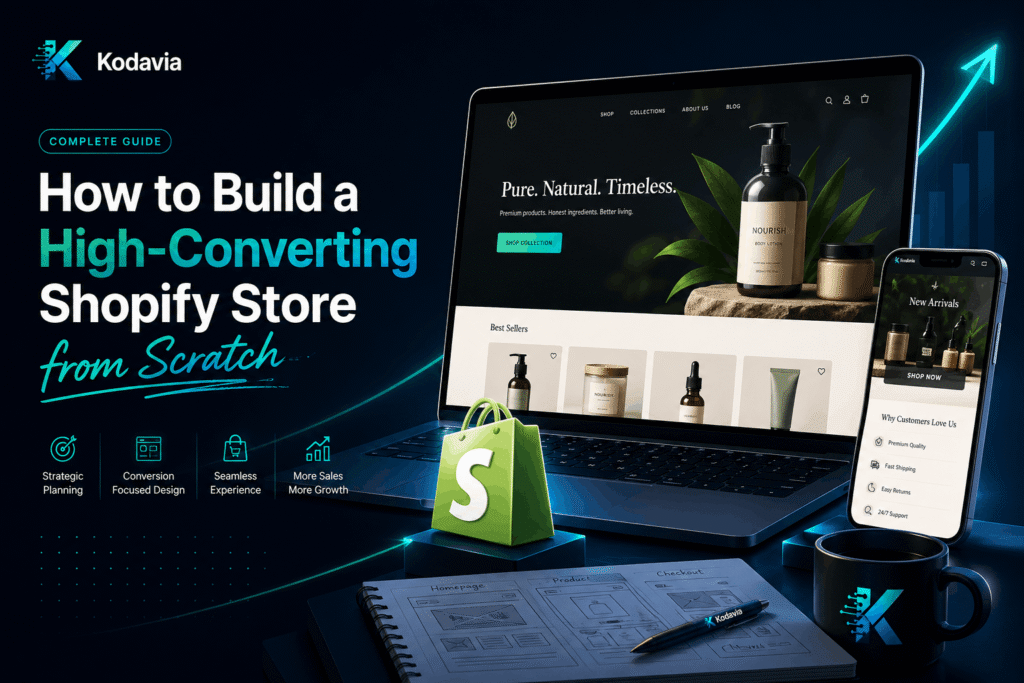
How to Build a High-Converting Shopify Store from Scratch

How to Build a High-Converting Shopify Store from Scratch – Shopify store design, conversion optimization, and ecommerce growth guide

Why Shopify is the Best Platform for Ecommerce Store Development

When it comes to ecommerce store development, Shopify stands above the competition for one simple reason: it removes every technical barrier between you and your customers. Unlike WooCommerce, which requires server management, or Magento, which demands developer-level expertise, Shopify gives you a complete, hosted solution that scales from your first sale to millions in annual revenue.

Here is why brands consistently choose Shopify for their ecommerce store development:

  • Fully hosted infrastructure with 99.99% uptime SLA
  • Built-in SSL certificates and PCI-compliant checkout
  • Native mobile optimization out of the box
  • 2,000+ apps in the Shopify App Store
  • Shopify Payments to eliminate third-party payment gateway fees
  • Multi-channel selling across social media, Amazon, and physical retail
  • Robust analytics and reporting dashboard
  • Shopify Markets for international ecommerce expansion

The numbers back this up. Shopify powers over 4.6 million online stores across 175 countries, processing more than 500 billion dollars in total commerce to date. For businesses serious about Shopify store development, there is no more proven platform.

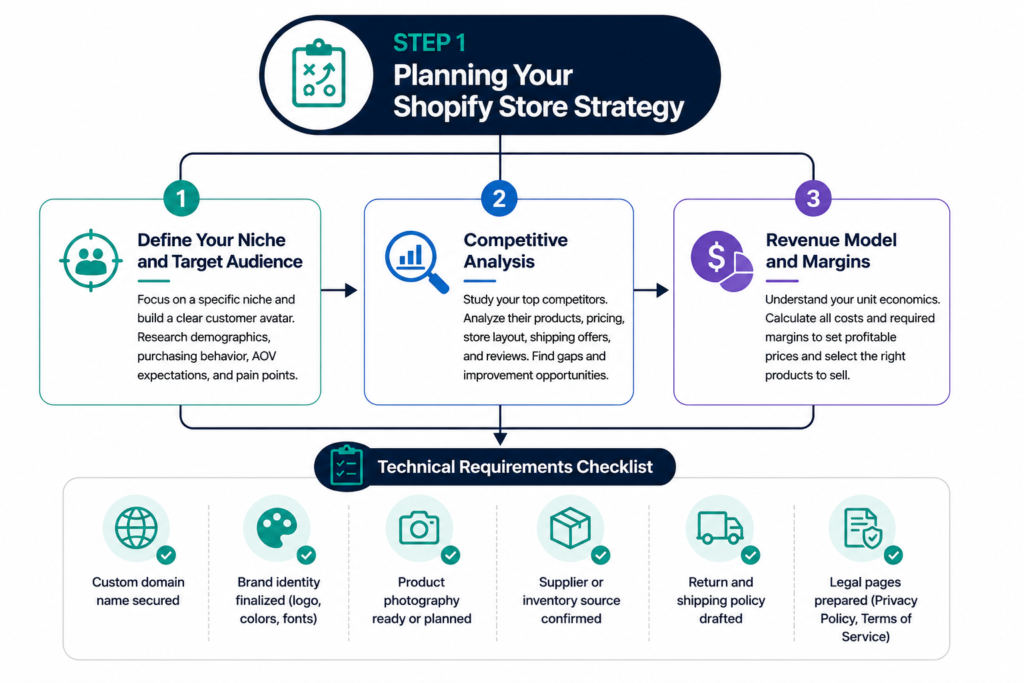
Shopify store planning strategy infographic showing niche selection, competitive analysis, revenue model planning, and technical requirements checklist

Step 1: Planning Your Shopify Store Strategy

Every successful Shopify store development project starts with a clear strategy. Before you touch a theme or upload a single product, you need answers to three foundational questions.

Define Your Niche and Target Audience

Trying to sell everything to everyone is the fastest route to selling nothing. The most profitable Shopify stores are tightly focused on a specific niche with a well-defined customer avatar. Spend time researching your target audience’s demographics, purchasing behavior, average order value expectations, and primary pain points.

Competitive Analysis

Study your top five competitors’ Shopify stores carefully. Analyze their product catalog structure, pricing strategy, homepage layout, shipping offers, and customer reviews. Look for gaps you can exploit and best practices you can adopt and improve upon.

Revenue Model and Margins

Before you build, understand your unit economics. Calculate landed cost per product, Shopify transaction fees, shipping costs, return rates, and your required margin to be profitable. This will directly influence your pricing strategy and which products you prioritize.

Technical Requirements Checklist

  • Custom domain name secured
  • Brand identity finalized (logo, colors, fonts)
  • Product photography ready or planned
  • Supplier or inventory source confirmed
  • Return and shipping policy drafted
  • Legal pages prepared (Privacy Policy, Terms of Service)

Step 2: Choosing the Right Shopify Plan

Shopify offers multiple plans, and selecting the wrong one either limits your growth or costs you unnecessary money. Here is a straightforward breakdown for your Shopify store development decision

For most new Shopify store development projects, start with the Basic plan and upgrade as your revenue grows. The transaction fee savings on higher plans only become meaningful once you are processing significant monthly volume.

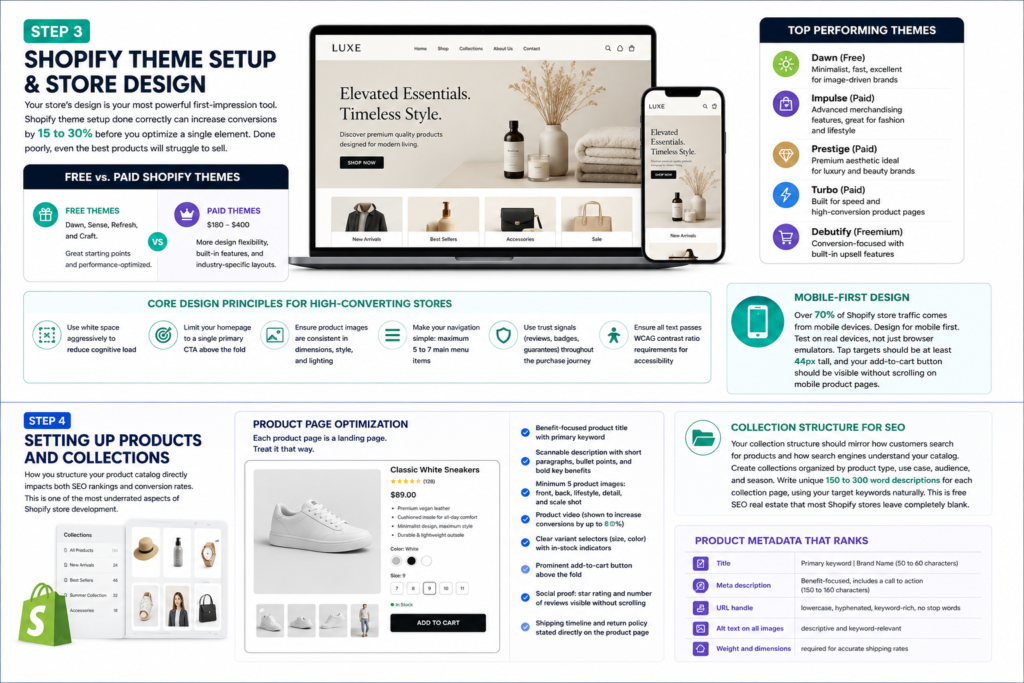
Step 3: Shopify Theme Setup and Store Design


Your store’s design is your most powerful first-impression tool. Shopify theme setup done correctly can increase conversions by 15 to 30 percent before you optimize a single element. Done poorly, even the best products will struggle to sell.

Free vs. Paid Shopify Themes

Shopify offers free themes including Dawn, Sense, Refresh, and Craft. These are excellent starting points and are performance-optimized. Paid themes from the Shopify Theme Store range from $180 to $400 and typically offer more design flexibility, built-in features, and industry-specific layouts.

For most Shopify store development projects, consider these top-performing themes:

  • Dawn (Free): Minimalist, fast, excellent for image-driven brands
  • Impulse (Paid): Advanced merchandising features, great for fashion and lifestyle
  • Prestige (Paid): Premium aesthetic ideal for luxury and beauty brands
  • Turbo (Paid): Built for speed and high-conversion product pages
  • Debutify (Freemium): Conversion-focused with built-in upsell features

Core Design Principles for High-Converting Shopify Stores

  • Use white space aggressively to reduce cognitive load
  • Limit your homepage to a single primary call to action above the fold
  • Ensure product images are consistent in dimensions, style, and lighting
  • Make your navigation simple: maximum 5 to 7 main menu items
  • Use trust signals (reviews, badges, guarantees) throughout the purchase journey
  • Ensure all text passes WCAG contrast ratio requirements for accessibility

Mobile-First Design

Over 70 percent of Shopify store traffic comes from mobile devices. Every design decision during your Shopify theme setup must prioritize mobile experience. Test on real devices, not just browser emulators. Tap targets should be at least 44 pixels tall, and your add-to-cart button should be visible without scrolling on mobile product pages.

Step 4: Setting Up Products and Collections

How you structure your product catalog directly impacts both SEO rankings and conversion rates. This is one of the most underrated aspects of Shopify store development.

Product Page Optimization

Each product page is a landing page. Treat it that way. A high-converting Shopify product page includes:

  • Benefit-focused product title with primary keyword included naturally
  • Scannable description with short paragraphs, bullet points, and bold key benefits
  • Minimum 5 product images: front, back, lifestyle, detail, and scale shot
  • Product video (shown to increase conversions by up to 80 percent)
  • Clear variant selectors (size, color) with in-stock indicators
  • Prominent add-to-cart button in high-contrast color above the fold
  • Social proof: star rating and number of reviews visible without scrolling
  • Shipping timeline and return policy stated directly on the product page

Collection Structure for SEO

Your collection structure should mirror how customers search for products and how search engines understand your catalog. Create collections organized by product type, use case, audience, and season. Write unique 150 to 300 word descriptions for each collection page, using your target keywords naturally. This is free SEO real estate that most Shopify stores leave completely blank.

Product Metadata That Ranks

  • Title: Primary keyword | Brand Name (50 to 60 characters)
  • Meta description: Benefit-focused, includes a call to action (150 to 160 characters)
  • URL handle: lowercase, hyphenated, keyword-rich, no stop words
  • Alt text on all images: descriptive and keyword-relevant
  • Weight and dimensions: required for accurate shipping rates

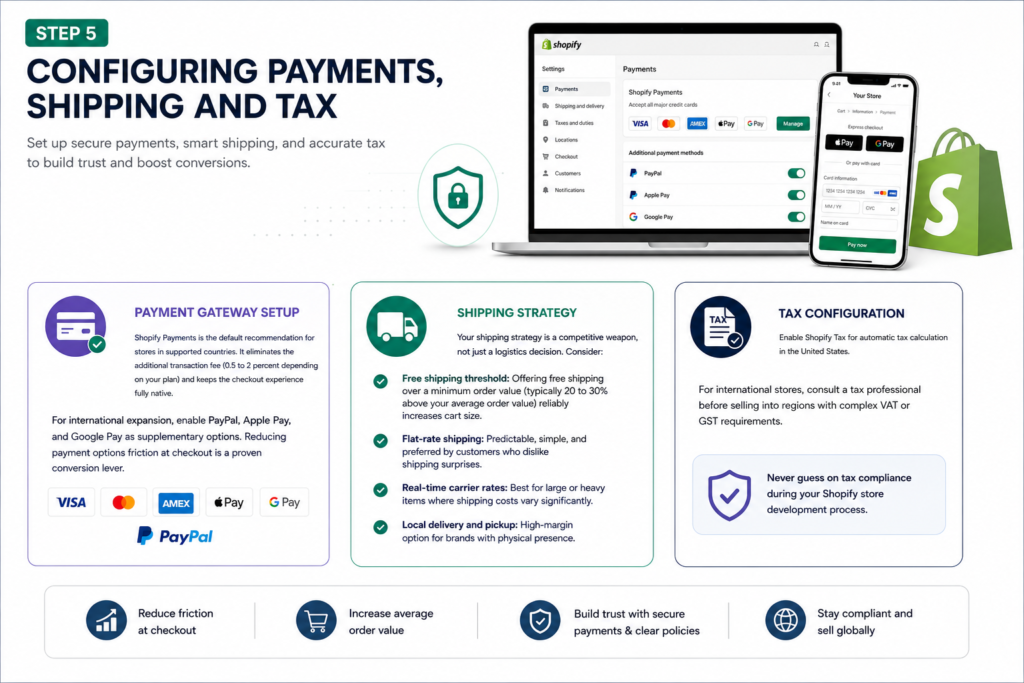
Step 5: Configuring Payments, Shipping and Tax

Shopify payments, shipping, and tax configuration infographic showing payment gateway setup, shipping strategy options, tax compliance, and ecommerce checkout optimization

Payment Gateway Setup

Shopify Payments is the default recommendation for stores in supported countries. It eliminates the additional transaction fee (0.5 to 2 percent depending on your plan) and keeps the checkout experience fully native. For international expansion, enable PayPal, Apple Pay, and Google Pay as supplementary options. Reducing payment options friction at checkout is a proven conversion lever.

Shipping Strategy

Your shipping strategy is a competitive weapon, not just a logistics decision. Consider:

  • Free shipping threshold: Offering free shipping over a minimum order value (typically 20 to 30 percent above your average order value) reliably increases cart size
  • Flat-rate shipping: Predictable, simple, and preferred by customers who dislike shipping surprises
  • Real-time carrier rates: Best for large or heavy items where shipping costs vary significantly
  • Local delivery and pickup: High-margin option for brands with physical presence

Tax Configuration

Enable Shopify Tax for automatic tax calculation in the United States. For international stores, consult a tax professional before selling into regions with complex VAT or GST requirements. Never guess on tax compliance during your Shopify store development process.

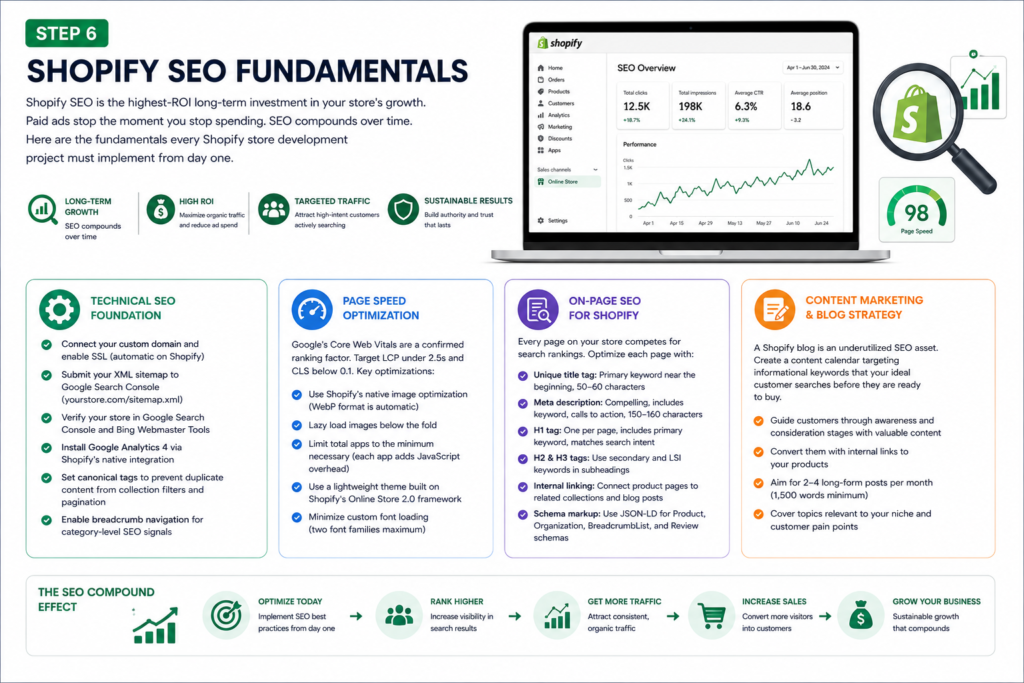
Step 6: Shopify SEO Fundamentals

Shopify SEO fundamentals infographic featuring technical SEO setup, page speed optimization, content marketing strategy, on-page SEO, and organic traffic growth for ecommerce stores

Shopify SEO is the highest-ROI long-term investment in your store’s growth. Paid ads stop the moment you stop spending. SEO compounds over time. Here are the fundamentals every Shopify store development project must implement from day one.

Technical SEO Foundation

  • Connect your custom domain and enable SSL (automatic on Shopify)
  • Submit your XML sitemap to Google Search Console (yourstore.com/sitemap.xml)
  • Verify your store in Google Search Console and Bing Webmaster Tools
  • Install Google Analytics 4 via Shopify’s native integration
  • Set canonical tags to prevent duplicate content from collection filters and pagination
  • Enable breadcrumb navigation for category-level SEO signals

Page Speed Optimization

Google’s Core Web Vitals are a confirmed ranking factor. Target a Largest Contentful Paint under 2.5 seconds and a Cumulative Layout Shift score below 0.1. Key optimizations for Shopify store speed:

  • Use Shopify’s native image optimization (WebP format is automatic)
  • Lazy load images below the fold
  • Limit total apps to the minimum necessary (each app adds JavaScript overhead)
  • Use a lightweight theme built on Shopify’s Online Store 2.0 framework
  • Minimize custom font loading (two font families maximum)

On-Page SEO for Shopify

Every page on your Shopify store competes for search rankings. Optimize each page with:

  • Unique title tag: Primary keyword near the beginning, 50 to 60 characters
  • Meta description: Compelling, includes keyword, calls to action, 150 to 160 characters
  • H1 tag: One per page, includes primary keyword, matches search intent
  • H2 and H3 tags: Use secondary and LSI keywords in subheadings
  • Internal linking: Connect product pages to related collections and blog posts
  • Schema markup: Use JSON-LD for Product, Organization, BreadcrumbList, and Review schemas

Content Marketing and Blog Strategy

A Shopify blog is an underutilized SEO asset. Create a content calendar targeting informational keywords that your ideal customer searches before they are ready to buy. Guide them through the awareness and consideration stages with high-quality content, then convert them with internal links to your products. Aim for two to four long-form posts per month (1,500 words minimum) covering topics relevant to your niche.

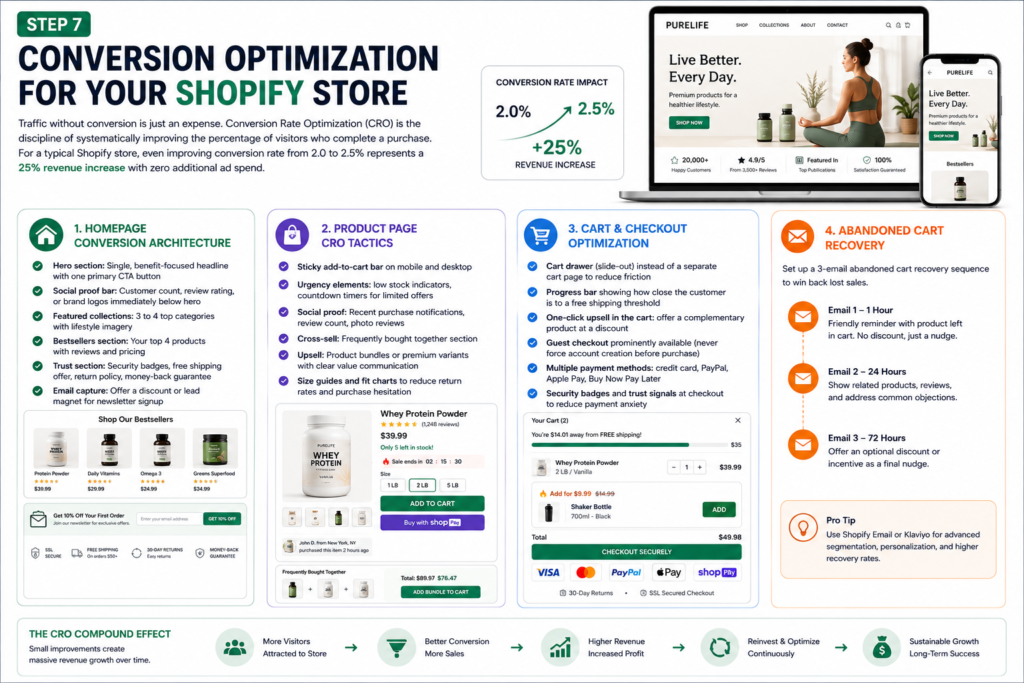
Step 7: Conversion Optimization for Your Shopify Store

Shopify conversion optimization infographic showing homepage CRO, product page optimization, cart recovery, checkout improvements, and abandoned cart email strategies

Traffic without conversion is just an expense. Conversion rate optimization (CRO) is the discipline of systematically improving the percentage of visitors who complete a purchase. For a typical Shopify store, even improving conversion rate from 2.0 to 2.5 percent represents a 25 percent revenue increase with zero additional ad spend.

Homepage Conversion Architecture

  • Hero section: Single, benefit-focused headline with one primary CTA button
  • Social proof bar: Customer count, review rating, or brand logos immediately below hero
  • Featured collections: 3 to 4 top categories with lifestyle imagery
  • Bestsellers section: Your top 4 products with reviews and pricing
  • Trust section: Security badges, free shipping offer, return policy, money-back guarantee
  • Email capture: Offer a discount or lead magnet for newsletter signup

Product Page CRO Tactics

  • Sticky add-to-cart bar on mobile and desktop
  • Urgency elements: low stock indicators, countdown timers for limited offers
  • Social proof: Recent purchase notifications, review count, photo reviews
  • Cross-sell: Frequently bought together section
  • Upsell: Product bundles or premium variants with clear value communication
  • Size guides and fit charts to reduce return rates and purchase hesitation

Cart and Checkout Optimization

Cart abandonment averages 70 percent across ecommerce stores. Reduce it with:

  • Cart drawer (slide-out) instead of a separate cart page to reduce friction
  • Progress bar showing how close the customer is to a free shipping threshold
  • One-click upsell in the cart: offer a complementary product at a discount
  • Guest checkout prominently available (never force account creation before purchase)
  • Multiple payment methods: credit card, PayPal, Apple Pay, Buy Now Pay Later
  • Security badges and trust signals at checkout to reduce payment anxiety

Abandoned Cart Recovery

Set up a 3-email abandoned cart recovery sequence: first email at 1 hour (no discount, just a reminder), second email at 24 hours (show related products or address common objections), third email at 72 hours (optional small discount as a final nudge). Shopify’s native email marketing handles this natively, or use Klaviyo for advanced segmentation and personalization.

Step 8: Essential Shopify Apps to Install

The Shopify App Store has over 8,000 apps. Installing too many degrades site performance. Here are the essential categories and recommended apps for a high-converting Shopify store development stack.

Category

Recommended App

Purpose

Email Marketing

Klaviyo

Flows, segmentation, abandoned cart

Product Reviews

Judge.me / Loox

Photo reviews, trust building

Upsell / Cross-sell

ReConvert / Zipify

Post-purchase and in-cart upsells

SEO

Plug In SEO / TinyIMG

Meta optimization, image compression

Loyalty Program

Smile.io / Yotpo

Points, rewards, referral programs

Live Chat / Support

Tidio / Gorgias

Instant support, reduce pre-buy hesitation

Subscription

Recharge / Bold

Recurring revenue from repeat buyers

Analytics

Triple Whale / Northbeam

Attribution, ROAS tracking across channels

Inventory

Stocky / Katana

Purchase orders, low stock alerts

Returns

Loop Returns

Self-service returns, reduce support load

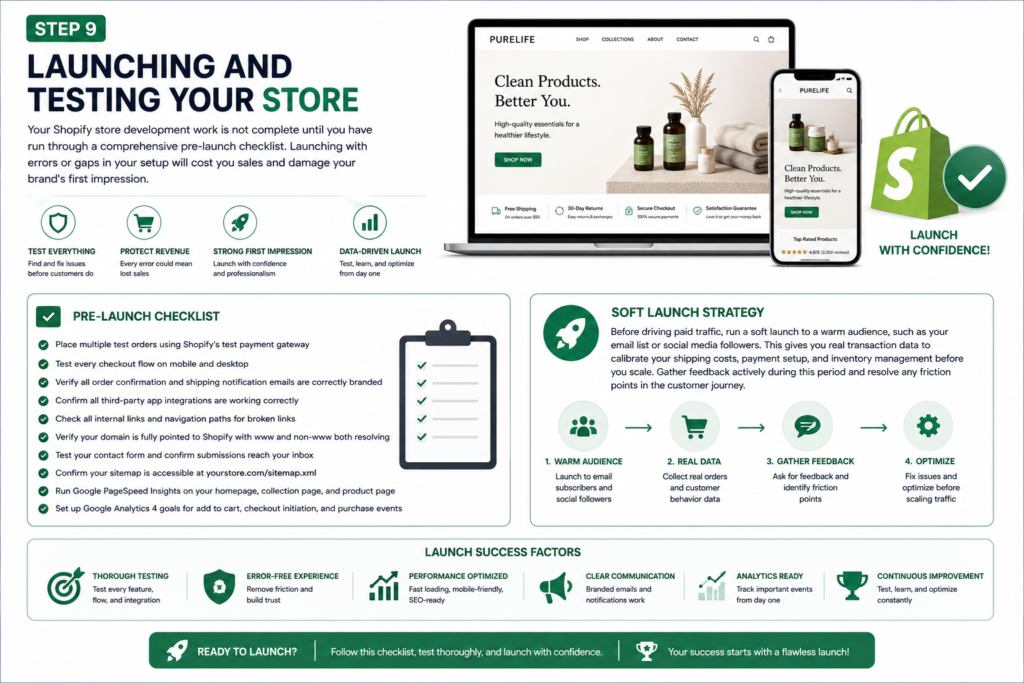
Step 9: Launching and Testing Your Store

Shopify store launch checklist infographic showing pre-launch testing, checkout verification, analytics setup, soft launch strategy, and ecommerce store deployment

Your Shopify store development work is not complete until you have run through a comprehensive pre-launch checklist. Launching with errors or gaps in your setup will cost you sales and damage your brand’s first impression.

Pre-Launch Checklist

  • Place multiple test orders using Shopify’s test payment gateway
  • Test every checkout flow on mobile and desktop
  • Verify all order confirmation and shipping notification emails are correctly branded
  • Confirm all third-party app integrations are working correctly
  • Check all internal links and navigation paths for broken links
  • Verify your domain is fully pointed to Shopify with www and non-www both resolving
  • Test your contact form and confirm submissions reach your inbox
  • Confirm your sitemap is accessible at yourstore.com/sitemap.xml
  • Run Google PageSpeed Insights on your homepage, collection page, and product page
  • Set up Google Analytics 4 goals for add to cart, checkout initiation, and purchase events

Soft Launch Strategy

Before driving paid traffic, run a soft launch to a warm audience, such as your email list or social media followers. This gives you real transaction data to calibrate your shipping costs, payment setup, and inventory management before you scale. Gather feedback actively during this period and resolve any friction points in the customer journey.

Step 10: Post-Launch Growth Strategies

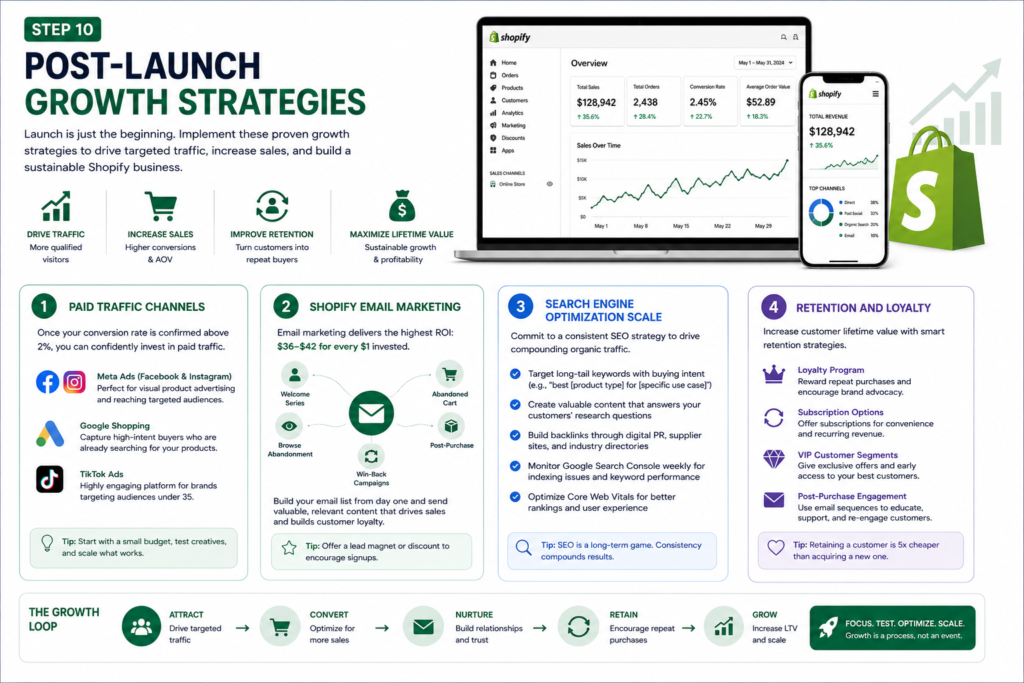
Shopify post-launch growth strategies infographic showing paid traffic channels, email marketing automation, SEO scaling, customer retention, and loyalty program optimization

Paid Traffic Channels

Once your conversion rate is confirmed above 2 percent, you can confidently invest in paid traffic. Start with Meta Ads (Facebook and Instagram) for direct-to-consumer product advertising, as the visual format aligns perfectly with Shopify product categories. Google Shopping campaigns capture high-intent buyers who are already searching for your products. TikTok Ads are increasingly powerful for brands targeting audiences under 35.

Shopify Email Marketing

Email marketing consistently delivers the highest return on investment of any ecommerce channel, with industry averages of $36 to $42 for every $1 invested. Prioritize building your email list from day one. Set up core automated flows immediately: welcome series, abandoned cart, browse abandonment, post-purchase, and win-back campaigns. Then layer in regular campaign emails to your full list.

Search Engine Optimization Scale

After launch, commit to a consistent SEO content program. Target long-tail keywords with buying intent such as ‘best [product type] for [specific use case]’ and informational queries your ideal customer searches during the research phase. Build backlinks through digital PR, supplier websites, and industry directories. Monitor Google Search Console weekly for indexing issues, keyword performance trends, and Core Web Vitals status.

Retention and Loyalty

Customer acquisition cost continues to rise across all paid channels. The most sustainable growth strategy for any Shopify store is to increase customer lifetime value through retention marketing. Implement a loyalty program, subscription options where applicable, VIP customer segments with exclusive offers, and a proactive post-purchase email sequence that turns first-time buyers into repeat customers.

Common Shopify Store Development Mistakes to Avoid

After working with dozens of Shopify brands, these are the mistakes that most consistently kill conversion rates and stall growth.

  • Launching with a slow theme: page speed is a ranking factor and a conversion factor. Test before you launch.
  • Ignoring mobile product pages: your desktop view may look perfect while your mobile experience is broken
  • Thin product descriptions: copy that fails to address objections, build desire, and close the sale will drag conversions down regardless of your traffic quality
  • No trust signals: first-time buyers are inherently skeptical. Badges, reviews, guarantees, and clear policies remove doubt at the point of purchase
  • Installing too many apps: every app adds page weight and load time. Audit your app stack quarterly and remove anything that does not directly contribute to revenue
  • Skipping email capture from day one: your email list is your most valuable owned asset. Start building it before your first sale
  • Neglecting collection page SEO: collection pages often have higher commercial search volume than individual product pages. Write unique descriptions and optimize their metadata
  • Setting and forgetting: successful Shopify store development is an ongoing process. Analyze your data weekly, run A/B tests consistently, and iterate based on evidence

Building a high-converting Shopify store from scratch is not a one-time task. It is a systematic process of strategic planning, precise technical execution, and continuous optimization. Every element described in this guide, from your Shopify theme setup to your abandoned cart sequence, works together to create a purchase experience that builds trust and drives revenue.

The brands that win with Shopify store development are those that treat their online store as a living product, not a one-time project. They measure everything, test consistently, and optimize relentlessly.

If you are looking for expert Shopify store development services that take your brand from concept to conversion, our team specializes in building custom Shopify stores engineered for measurable growth. From initial strategy to post-launch optimization, we handle the technical complexity so you can focus on scaling your business.

Shopify Development Agency

Not Sure Which Platform is Right for Your Brand?

Kodavia's team analyzes your business model, growth goals, and technical requirements to recommend and build the exact ecommerce setup that converts. No guesswork, just data-driven decisions.
Get a Free Platform Audit →
View Shopify Services